
Postman can export any collection as a single JSON file. That file is useful as a backup,
a handoff, or the starting point for moving requests into a portable text format such as
.http. The export preserves the collection structure and request definitions, but it
does not turn every Postman feature into something another client can run.
This guide shows the safe path: export the collection JSON, identify the values stored elsewhere, and inspect the result before you convert or commit it.
Export a collection in four steps
Postman has tucked the export option away, so it takes a moment to find. It lives at the bottom of a submenu:
- Open Postman and find the collection in the Collections sidebar.
- Hover over the collection and open its ⋯ actions menu, then go to More → Export.
- In the Export collection dialog, ignore the invite prompt and click Export JSON. Postman no longer asks you to pick a format — the export is the current Collection v2.1 shape.
- Save the resulting
.jsonfile somewhere outside a public repository until you have checked it for credentials.
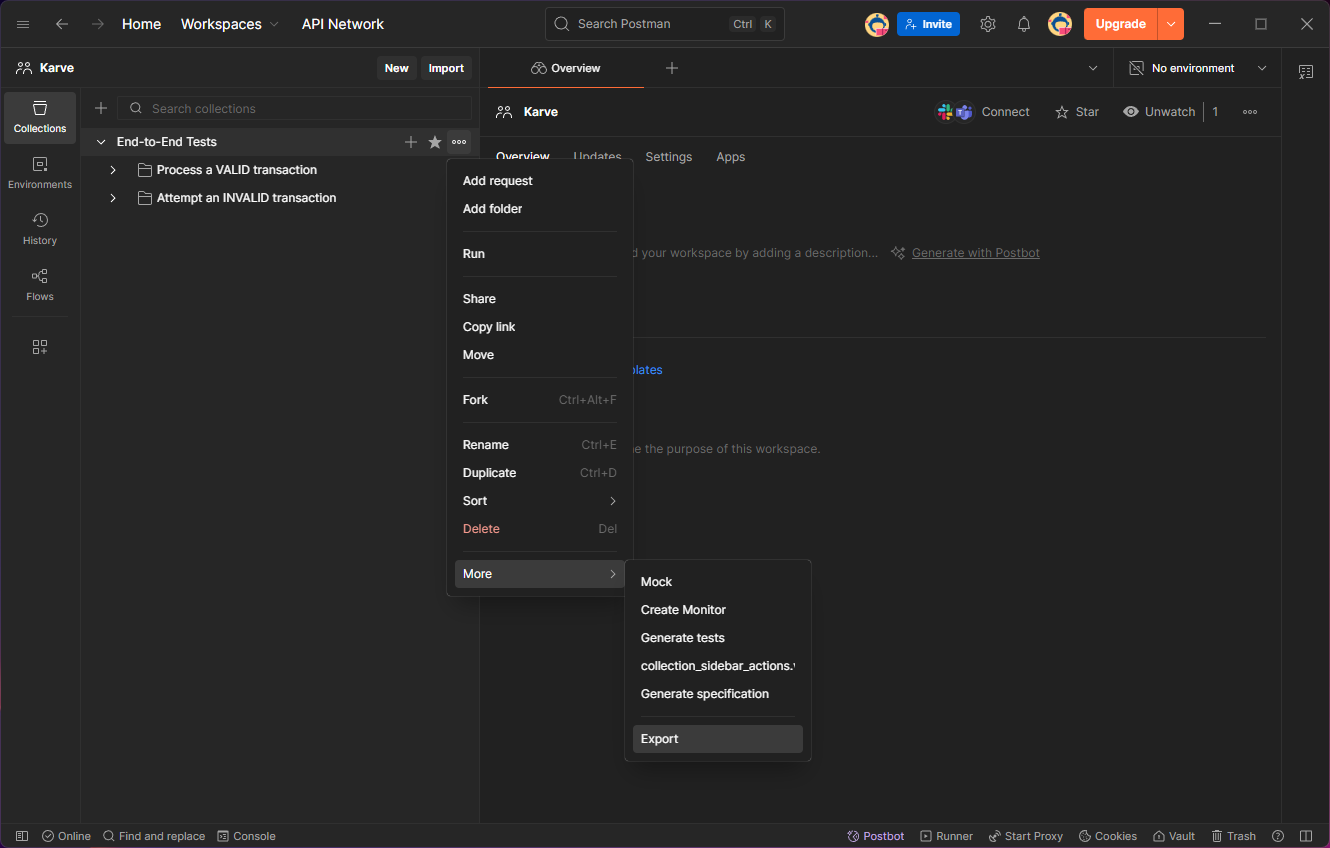
Repeat this for each collection you want to move. A collection export is not a complete account export and does not automatically bundle every environment used by its requests.
What is usually inside the JSON
A Collection v2.1 export can describe:
- nested folders and request names;
- HTTP methods, URLs, query parameters, and headers;
- raw JSON or text request bodies and URL-encoded form fields;
- collection variables;
- supported authentication settings;
- Postman-specific scripts and tests attached to folders or requests.
The last item matters: JSON can store a Postman script, but a .http client cannot
run it. Treat scripts and tests as migration work, not request metadata.
Check the pieces that live outside the collection
Before deleting or reorganizing anything in Postman, make a short inventory:
- Environment and global variables. Values such as
baseUrlortokenmay be referenced by the collection but stored in a separate Postman environment. - Pre-request scripts and tests. Record what each script does. A token generator or assertion needs a deliberate replacement.
- File-backed request bodies. An export can reference a local file without embedding the file itself.
- Secrets. Headers, variables, examples, and saved bodies can all contain credentials.
Open the exported JSON in an editor and search for names such as Authorization,
token, secret, password, and apiKey. Do not assume a collection is safe to commit
just because it came from a developer tool.
Convert the export to .http files
Karve's free Postman collection to .http converter runs in your
browser. Drop or paste a v2.0/v2.1 collection export, review the warnings, then copy or
download the generated .http file. The conversion does not upload your collection.
The useful parts become readable request blocks:
@baseUrl = https://api.example.com

### List orders
GET {{baseUrl}}/orders
Accept: application/json
Conversion is intentionally conservative. Requests, folders, headers, query parameters, common bodies, variables, and representable auth can move across. Postman scripts, tests, file uploads, unresolved external environment values, and unsupported auth/body modes need manual review. The converter reports those limits instead of pretending the migration is complete.
After conversion, paste the output into the
.http file validator and run representative requests against
a safe development environment. Karve itself does not import Postman collections; it
opens the .http or .rest files produced by the conversion.
Keep the export or keep the result?
Keep the original JSON temporarily as a migration reference. Once the important requests
work as .http, the text files are usually the better long-term artifact:
- ordinary Git diffs instead of a large nested JSON document;
- readable requests beside the code they exercise;
- no application account required to open them;
- compatibility with several editors and clients.
For the full move, follow migrating from Postman to .http files. If you are still choosing a representation, compare Postman collections and .http files.