

The API client for developers on Windows
Karve is a fast, offline, native API workspace built around the .http and
.rest files already scattered across your repos.
Organize them in one workspace and run them without bloat or subscriptions.
Start with a 15-day free trial
Windows 10/11 · x64 + ARM64 native · one-time purchase
Bigger than an API client. Smaller than a platform.
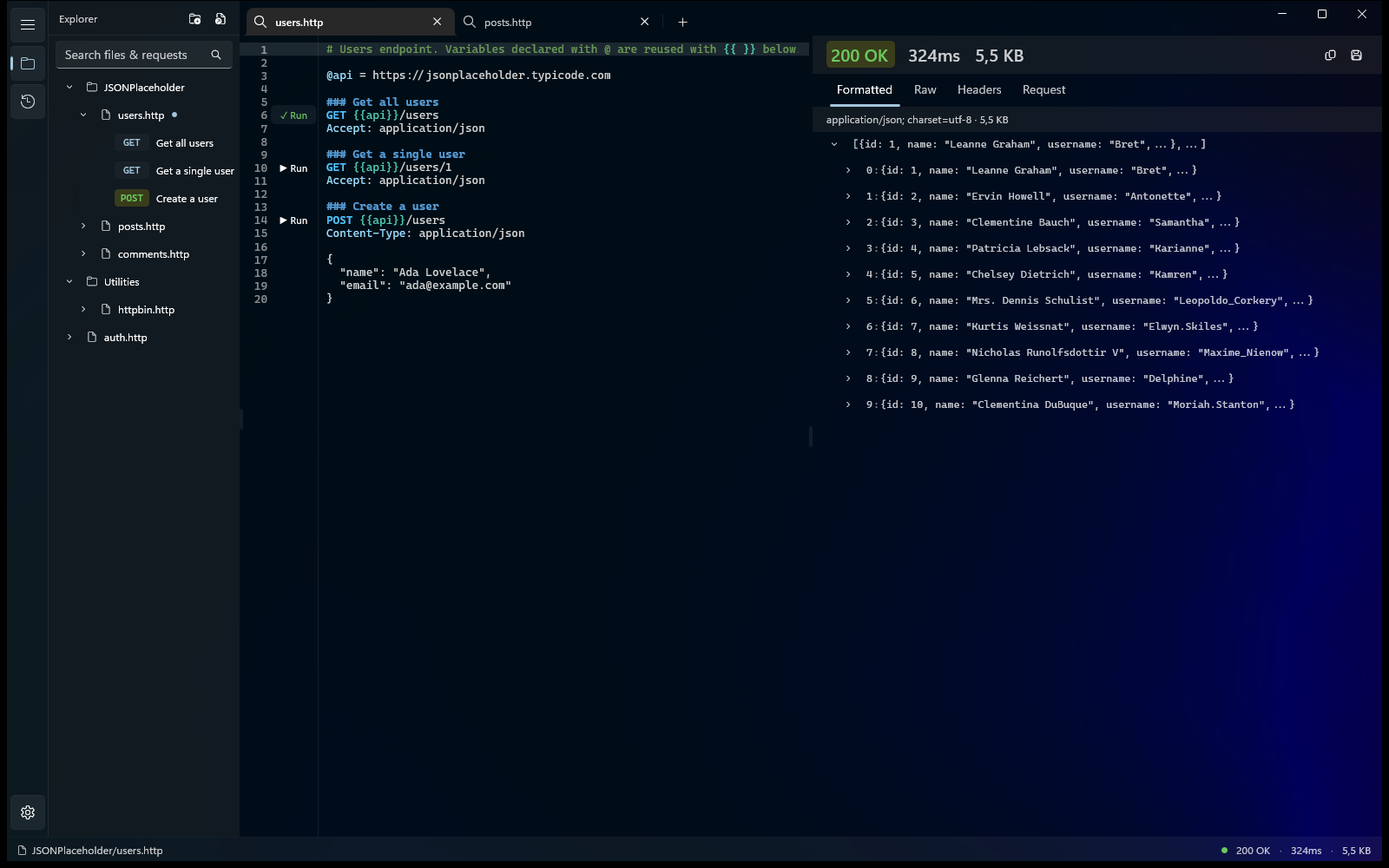
Karve extends your .http files with the workspace features missing from most IDE runners: a file explorer, environments, tabs, persistent request history, and a structured response viewer.
Your requests stay as plain text on disk. They live next to your code, work with Git, and stay editable in any IDE.
Karve doesn't replace your repo structure or introduce a proprietary collection format. It's a native REST client for Windows that adds a workspace on top of the files you already use.
The problem
.http is a great format — simple, text-based, Git-friendly, and easy to keep next to your code. The pain starts once those files spread across repositories, services, and environments.
Requests pile up everywhere
The same .http files scatter across repos and editor tabs — and you hunt for the one you need.
You lose the thread
Which request hit which service, and what did it return last time? The context is gone the moment you switch windows.
What actually got sent?
Between variables and substitution, the real request on the wire is a guess — until something breaks in production.
Before / after
-
Hunt for the right .http file across repos.
-
Paste it into a separate client and fix the variables by hand.
-
Run it — then lose the response the moment you move on.
-
Repeat for the next service, in the next window.
-
Gather .http files from every repo into one workspace — files never move.
-
Variables resolve in the file — run straight from the method line.
-
Each response stays in its own panel; the resolved request shows exactly what was sent.
-
Tabs and history keep your place across services.
The format
Karve's collection format is one you already know. Hover the highlighted parts of this file — it runs today in your editor, and in Karve.
Get open orders GET /orders?status=open Authorization: Bearer ### Create an order Authorization: Bearer {{token}} Content-Type: application/json { "sku": "LONGSHIP-01", "qty": 2 }
Hover or tap the highlighted parts. Full reference in the .http format guide.
File variables
Declare @baseUrl once at the top. Every request below reuses it with {{baseUrl}} — change the host in one line, not in forty.
Many requests, one file
### separates and names requests. Karve turns each one into a runnable entry in the explorer — the whole collection is just this file.
Environments fill the blanks
{{token}} isn't in the file — it resolves from the active .env environment (dev, staging, prod) at send time. Commit the file, not the secret.
Run from the method line
In Karve, every method line gets a Run button. Click it and the response opens beside the editor — status, timing, headers, and a collapsible JSON tree.
No lock-in, by design
orders.http is a plain file in your repo. It already runs in VS Code REST Client and JetBrains HTTP Client — Karve gives it a native Windows home, not a new format.
Plain text pays off
The same one-line change — an endpoint bumped from v1 to v2 — as your reviewer sees it in the pull request.
### Get open orders - GET {{baseUrl}}/v1/orders?status=open + GET {{baseUrl}}/v2/orders?status=open Authorization: Bearer {{token}}
Two lines. Your reviewer approves it from their phone.
"item": [{ "id": "9c1e4f6a-…", "name": "Get open orders", - "updatedAt": "2026-06-28T11:02:44.318Z", + "updatedAt": "2026-07-02T09:15:07.552Z", "request": { "method": "GET", "header": [ … ], "url": { - "raw": "{{baseUrl}}/v1/orders?status=open", + "raw": "{{baseUrl}}/v2/orders?status=open", "host": [ "{{baseUrl}}" ], - "path": [ "v1", "orders" ], + "path": [ "v2", "orders" ], "query": [ { "key": "status", "value": "open" } ] } }, - "_meta": { "rev": 41, "hash": "b04c…" } + "_meta": { "rev": 42, "hash": "77ae…" } }]
The same change in a proprietary collection export. Good luck spotting what matters.
Your requests diff like code, because they are code.
Features
And the rest
File-level variables
Declare @baseUrl once and reuse it with {{baseUrl}} across every request in the file.
Tabs with session restore
Work across multiple files in tabs. Karve restores your open tabs on every launch, so you pick up where you left off.
Persistent, searchable history
Every request and response is saved to a local database and searchable across sessions — re-open any call straight into a tab.
Light & dark, with Mica
Native Mica material; light and dark themes follow your Windows setting automatically.
Native WinUI 3
Built on WinUI 3, not a browser in a box. Cold-starts in under 2 seconds, runs 0 background services, and sends no telemetry beyond crash diagnostics.
Drag-and-drop
Drop .http files and whole folders straight from Explorer onto the window.
Free tools
Try a free tool right now
100% client-side — nothing leaves your browserPaste any cURL command (DevTools → Copy as cURL works too) and get a runnable .http file:
POST https://api.example.com/v1/login
Content-Type: application/json
{
"email": "pavel@karve.dev",
"password": "hunter2"
}
Why I built Karve
As I was working a lot with microservices, I already kept my requests as .http files next to my code in repos. It was quite annoying to manage and work with them, especially when I need share requests, like get a token or something like that. So I built a tool to manage and run them. Karve is the workspace I wanted: your files stay on disk and stay yours, and the tool just helps you run and read them.
FAQ
Why .http files?
How do I run a .http file on Windows?
Why not just use VS Code?
Why not Bruno?
Is my data private?
Can I import from Postman?
What does it cost?
Who it's for
Karve is for Windows developers who already keep API requests as .http files across multiple repos and want one native workspace to organize, run, and inspect them.
-
You already run requests with an in-editor .http runner and want a real response viewer, environments, and history around the same files.
-
You work across microservices, and the same token and CRUD requests are duplicated in every repo.
-
You're done paying yearly for an API client that keeps your collections in its cloud.
Honest flip side: Karve is REST-only today. If you need GraphQL, gRPC, or team collaboration, it isn't the right tool yet — see what's coming next.
Pricing
Subscriptions add up. Karve doesn't.
Yearly prices as listed on our comparison pages.
Subscription total
$324
vs $29.99 once for Karve
You keep $294
Start with a 15-day free trial.
$29.99 Launch Summer Sale price · one-time purchase · v1.x updates included. No account, no subscription, no upsell. See pricing details.
15-day free trial · No account · No subscription · No metered requests
25% off until Sep 1