
Karve app icon

Karve

Git-friendly · Local-first · Owned-forever

All your .http files.
One native Windows workspace.

Organize and run the .http and .rest files already scattered across your repos. Files stay where they are, work with Git, and never move into a proprietary collection.

Start with a 15-day free trial

$29.99 once after the trial · No account · No subscription

Windows 10/11 · x64 + ARM64 native

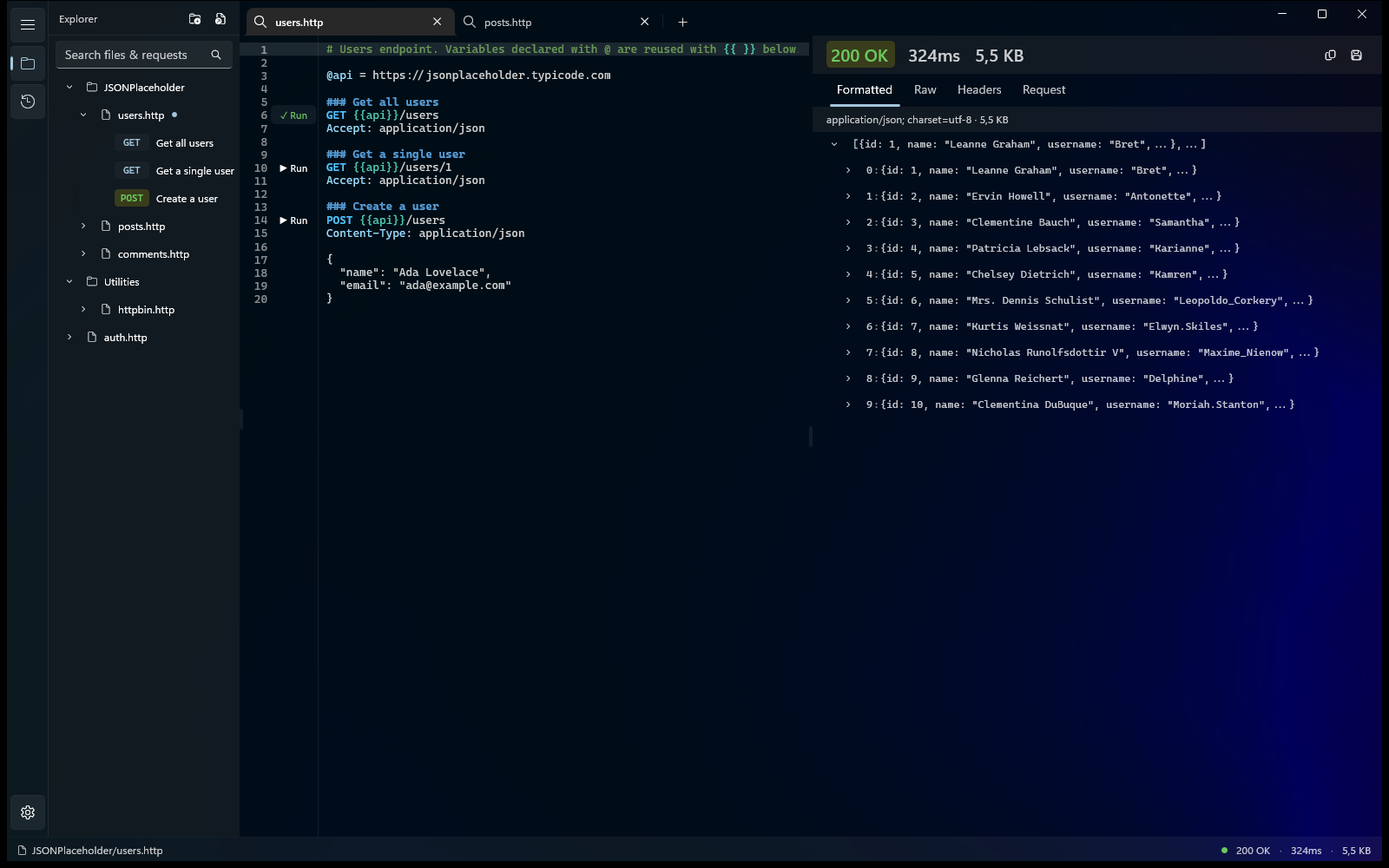
The Karve explorer showing virtual folders of .http files gathered from across the disk, with request tabs open and a response ready to inspect
Plain .http files Local-first Git-friendly Native Windows app One-time purchase ARM64 native

Without / with Karve

Without Karve
  • Hunt through repos for .http files.

  • Run requests in separate IDE windows.

  • Lose the context the moment you move on.

  • Wonder what your variables actually resolved to.

With Karve
  • One workspace across every repo.

  • Run requests directly from the file.

  • Searchable request + response history.

  • See the exact resolved request that was sent.

See it work

Pricing

Subscriptions add up. Karve doesn't.

Yearly prices as listed on our comparison pages.

Subscription total

$324

vs $29.99 once for Karve

You keep $294

Launch Summer Sale

Start with a 15-day free trial.

$29.99 Launch Summer Sale price · one-time purchase · v1.x updates included. No account, no subscription, no upsell. See pricing details.

15-day free trial · No account · No subscription · No metered requests

25% off until Sep 1

Bigger than an API client. Smaller than a platform.

Karve extends your .http files with the workspace features missing from most IDE runners: a file explorer, environments, tabs, persistent request history, and a structured response viewer.

Your requests stay as plain text on disk. They live next to your code, work with Git, and stay editable in any IDE.

Karve doesn't replace your repo structure or introduce a proprietary collection format. It's a native REST client for Windows that adds a workspace on top of the files you already use.

The format

Karve's collection format is one you already know. Hover the highlighted parts of this file — it runs today in your editor, and in Karve.


 Get open orders
GET /orders?status=open
Authorization: Bearer 

### Create an order

Authorization: Bearer {{token}}
Content-Type: application/json

{
  "sku": "LONGSHIP-01",
  "qty": 2
}

Hover or tap the highlighted parts. Full reference in the .http format guide.

File variables

Declare @baseUrl once at the top. Every request below reuses it with {{baseUrl}} — change the host in one line, not in forty.

Many requests, one file

### separates and names requests. Karve turns each one into a runnable entry in the explorer — the whole collection is just this file.

Environments fill the blanks

{{token}} isn't in the file — it resolves from the active .env environment (dev, staging, prod) at send time. Commit the file, not the secret.

Run from the method line

In Karve, every method line gets a Run button. Click it and the response opens beside the editor — status, timing, headers, and a collapsible JSON tree.

No lock-in, by design

orders.http is a plain file in your repo. It already runs in VS Code REST Client and JetBrains HTTP Client — Karve gives it a native Windows home, not a new format.

Plain text pays off

The same one-line change — an endpoint bumped from v1 to v2 — as your reviewer sees it in the pull request.

git diff
@@ orders.http @@
  ### Get open orders
- GET {{baseUrl}}/v1/orders?status=open
+ GET {{baseUrl}}/v2/orders?status=open
  Authorization: Bearer {{token}}

Two lines. Your reviewer approves it from their phone.

@@ collection.json @@
    "item": [{
      "id": "9c1e4f6a-…",
      "name": "Get open orders",
-     "updatedAt": "2026-06-28T11:02:44.318Z",
+     "updatedAt": "2026-07-02T09:15:07.552Z",
      "request": {
        "method": "GET",
        "header": [ … ],
        "url": {
-         "raw": "{{baseUrl}}/v1/orders?status=open",
+         "raw": "{{baseUrl}}/v2/orders?status=open",
          "host": [ "{{baseUrl}}" ],
-         "path": [ "v1", "orders" ],
+         "path": [ "v2", "orders" ],
          "query": [
            { "key": "status", "value": "open" }
          ]
        }
      },
-     "_meta": { "rev": 41, "hash": "b04c…" }
+     "_meta": { "rev": 42, "hash": "77ae…" }
    }]

The same change in a proprietary collection export. Good luck spotting what matters.

Your requests diff like code, because they are code.

And the rest

File-level variables

Declare @baseUrl once and reuse it with {{baseUrl}} across every request in the file.

Tabs with session restore

Work across multiple files in tabs. Karve restores your open tabs on every launch, so you pick up where you left off.

Persistent, searchable history

Every request and response is saved to a local database and searchable across sessions — re-open any call straight into a tab.

Light & dark, with Mica

Native Mica material; light and dark themes follow your Windows setting automatically.

Native WinUI 3

Built on WinUI 3, not a browser in a box. Cold-starts in under 2 seconds, runs 0 background services, and sends no telemetry beyond crash diagnostics.

Drag-and-drop

Drop .http files and whole folders straight from Explorer onto the window.

Free tools

Try a free tool right now

100% client-side — nothing leaves your browser

Paste any cURL command (DevTools → Copy as cURL works too) and get a runnable .http file:

POST https://api.example.com/v1/login
Content-Type: application/json

{
  "email": "pavel@karve.dev",
  "password": "hunter2"
}

Why I built Karve

As I was working a lot with microservices, I already kept my requests as .http files next to my code in repos. It was quite annoying to manage and work with them, especially when I needed to share requests, like getting a token or something like that. So I built a tool to manage and run them. Karve is the workspace I wanted: your files stay on disk and stay yours, and the tool just helps you run and read them.
Pavel, founder of Karve

Pavel

XAKPC Dev Labs · founder

Follow along on GitHub

FAQ

Why .http files?
Because they're open and text-based. Your requests live next to your code, diff cleanly in Git, and stay readable in any editor — no proprietary format, no export step, no lock-in. Karve runs the exact files you already have.
How do I run a .http file on Windows?
With Karve installed, you double-click it. Karve registers as the Windows handler for .http and .rest files, so any request file opens straight from File Explorer — press Run on the method line and read the response. No project, no extension, no IDE. Learn more →
Why not just use VS Code?
If you live in your editor, the REST Client extension is a great free option. Karve is for when you want a dedicated native workspace: gather .http files from many repos into virtual folders, get a richer response viewer (JSON tree, headers, timing), and keep tabs and history — no editor required. Karve vs VS Code REST Client →
Why not Bruno?
Karve doesn't invent its own format or collection store — it runs your existing .http files in place. It's native WinUI 3 (not Electron), a one-time purchase, and needs no account. Karve vs Bruno →
Is my data private?
Yes. Karve runs entirely on your machine — requests are sent straight from your PC and nothing is stored in any cloud. The only data it sends is anonymous crash diagnostics. Privacy policy →
Can I import from Postman?
.http and .rest files open directly — it's the same format VS Code REST Client and JetBrains HTTP Client use, so there's nothing to convert. Importing Postman collections and cURL is on the v1.1 roadmap →
What does it cost?
$29.99 during the Launch Summer Sale (25% off the regular $39.99, until September 1, 2026), a one-time purchase with a 15-day free trial — no subscription, no metered requests. For comparison: a Postman Solo plan runs about $108 every year; Karve costs less than four months of that, once. See pricing →

Who it's for

Karve is for Windows developers who already keep API requests as .http files across multiple repos and want one native workspace to organize, run, and inspect them.

  • You already run requests with an in-editor .http runner and want a real response viewer, environments, and history around the same files.

  • You work across microservices, and the same token and CRUD requests are duplicated in every repo.

  • You're done paying yearly for an API client that keeps your collections in its cloud.

Honest flip side: Karve is REST-only today. If you need GraphQL, gRPC, or team collaboration, it isn't the right tool yet — see what's coming next.

Launch Summer Sale

Ready when you are — start your 15-day free trial.

$29.99 Launch Summer Sale price · one-time purchase · v1.x updates included. No account, no subscription, no upsell. See pricing details.

15-day free trial · No account · No subscription · No metered requests

25% off until Sep 1